






Let's start your quick assessment here.
Start

Managed Cyber Security. Trusted by government.
Get the same intelligence and response capability we use to secure 42% of Federal Government agencies, engineered for business.
A secure, offsite data backup solution that keeps your data protected and recoverable when you need it
Fast, effective workload recovery with a fully managed DR capability that gets you back online quickly.
Managed Data and AI. Foundations to outcomes.
Why Us? Because it’s all about you.
We’re Australia’s most trusted cloud partner with local expertise, proven delivery and service excellence.
Built-in compliance so we can lead from the front.
‘Doing it Yourself’ can be empowering.
Following the guidelines to lead from the front.
Secure, sovereign, and compliant data centres.
Service excellence built on trust and technical expertise.
Best-in-class partners. Better outcomes for you.
Build your career with an award-winning, people-first team.
Home Cloud Services Public Cloud - Managed Azure Azure Virtual Desktop
Azure Virtual Desktop gives you secure access to the apps and data you need, on any device. With Macquarie Cloud Services’ Managed Azure Virtual Desktop, you get a solution built on validated reference architecture, tailored to your needs.

CIOs are under pressure to enable flexibility, protect corporate data and control costs, all while simplifying management. Managed Azure Virtual Desktop helps you modernise end-user computing without adding complexity.
Azure Virtual Desktop architected and operated with governance, compliance alignment and active cost management to reduce operational and financial risk.

Give users the desktop and apps they already know, including Microsoft 365, with fast file load times and seamless access from any device.

Built-in secure sign-on and multi-factor authentication help protect access, with role-based controls to manage sensitive data.

Use eligible Microsoft 365 or Windows licensing and access Windows 10 multi-session to align compute costs to user needs.

Provide a rich client experience across qualified devices, enabling secure work from the office, home or on the move.

Provision desktops, assign access and manage environments through Azure, reducing operational overhead.

From image publishing to monitoring and remediation, we continuously refine your Azure Virtual Desktop environment.
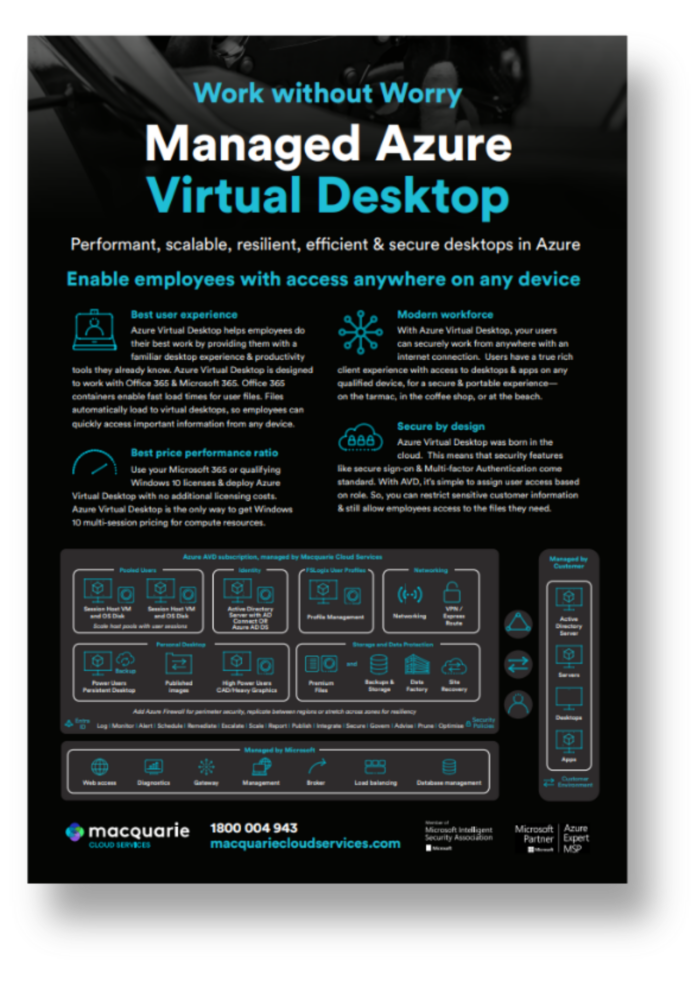
Managed Azure Virtual Desktop combines Microsoft’s desktop and app virtualisation service with expert design, deployment and ongoing operations from Macquarie Cloud Services. You gain centralised control, secure access to corporate data and a consistent user experience, without the overhead of managing complex infrastructure alone.
Proven ways to strengthen security, control cost and modernise end-user computing.

Centralise desktops and applications in Azure to help keep sensitive data within your controlled environment, rather than on local devices.

Enable employees and contractors to securely access corporate desktops and apps from virtually anywhere with an internet connection.

Support office moves, mergers or workforce changes by rapidly provisioning virtual desktops without rearchitecting on-premises infrastructure.

Shift focus from managing physical devices to managing users, policies and performance within a centralised Azure environment.
Designed with Essential 8 considerations from day one and governed through active Azure cost management, your environment stays secure, predictable and performance-focused. As your workforce, compliance obligations or usage patterns evolve, your Azure Virtual Desktop environment scales with control.

Azure Virtual Desktop designed and operated with identity-first controls and Essential 8 considerations from the start.

Active governance across Azure consumption, VM sizing and autoscaling to maintain predictable per-user costs.

Azure, EUC, networking and security capability to manage design, migration and day-two operations.
Structured, phased implementation that reduces disruption and builds stakeholder confidence.

Ongoing lifecycle, image and platform management to keep your environment stable and supported.

Service trusted across Australia, supported by local engineers and live NPS score of +96.
We’re here to guide you through your next steps.
Azure Virtual Desktop is a cloud-based service from Microsoft Azure that empowers organisations to build and oversee virtual desktops and applications in the cloud. Virtual desktops like Azure are accessible from different devices even without an internet connection, allowing collaboration and flexibility among remote users. Additionally, organisations seeking our cloud hosting services at Macquarie Cloud Services can utilise Azure Virtual Desktop to enhance their cloud infrastructure and access a range of Azure products.
Azure Virtual Desktop offers several benefits, including:
To connect to an Azure virtual desktop, you will need to follow these steps:
Azure Virtual Desktop is a software-as-a-service (SaaS) solution that allows you to provide your employees with access to their applications and data from anywhere, on any device. Your people can stay productive wherever they are, by gaining access to their familiar desktop and productivity tools. You can also keep all your users’ applications and tools up to date as they are accessed centrally, via the cloud. Azure Virtual Desktop uses Microsoft’s Azure infrastructure, which means that it offers scalability and flexibility. Also, security features like single sign-on and multi-factor authentication are standard. Azure Virtual Desktop also makes it easy to assign access to users based on their role, meaning it’s easy to restrict sensitive customer information and ensure everyone has the files they need.
To connect to an Azure virtual desktop, you will need to follow these steps:
To set up an Azure Virtual Desktop, you will need to follow these steps:
Azure Virtual Desktop provides an easy-to-use virtual desktop experience that can be accessed from anywhere, on any device. It integrates with Azure Active Directory and Microsoft Intune to make it easy to deploy, manage and secure access to applications and data.
IT teams are using Azure Virtual Desktop to provide employees with a consistent experience across devices, reduce the need for expensive hardware investments, and give employees access from anywhere.
It also allows IT teams to create a virtual desktop environment for their users. This allows IT teams to create an environment where users can access applications and resources as if they were accessing them on a physical computer.
Explore practical insights and resources designed to support informed cloud decisions, from optimisation to long-term strategy.

March 13, 2026
March 11, 2026
December 19, 2025