








Home Archives for September 30, 2026
Summary
- Under Microsoft’s shared responsibility model, you own your data and identities in Microsoft 365, not Microsoft.¹
- Native recovery features across Exchange, SharePoint, OneDrive, Teams and Entra ID are built for everyday mistakes, and each one expires. Retention ranges from 7 days for Entra ID backups to 93 days for SharePoint.
- These features sit inside your own tenant and recover workloads one at a time. That leaves them exposed during an attack.
- Australian frameworks, including the Essential Eight and APRA CPS 230, expect tested, protected and coordinated recovery.
What the shared responsibility model actually says
Most Australian organisations assume Microsoft protects their data. After all, Microsoft runs the platform, keeps it available and replicates it across data centres. Surely recovery is part of the deal?
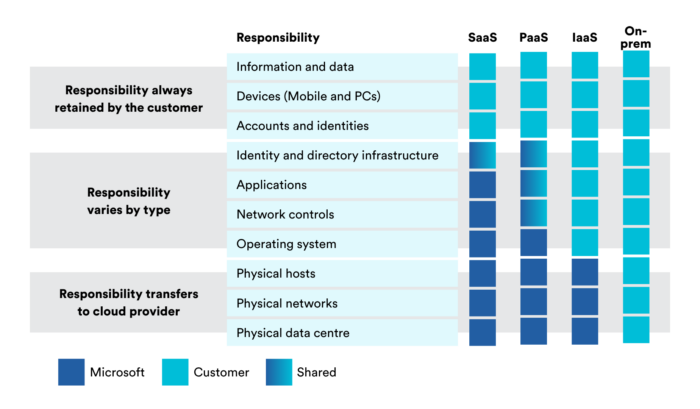
It isn’t. Microsoft’s own documentation is clear: for every cloud deployment type, the customer owns their data and identities and is responsible for protecting them.¹ That includes managing accounts and user access, as well backing up the data and creating a workflow to recover it should it be required.
In short, Microsoft keeps the platform running. Keeping your mailboxes, files, conversations and identities recoverable is your job.
How long Microsoft 365 keeps deleted data
- Exchange Online: Deleted items are kept for 14 days by default, extendable to a maximum of 30 days.²
- SharePoint and OneDrive: Deleted items are kept for 93 days, then permanently deleted.³ Microsoft keeps backups for 14 more days, but restores from them cover whole site collections only, not individual files.³
- Teams: Channel files are stored in SharePoint and shared chat files in OneDrive, so Teams content follows the same limits.
- Entra ID: Microsoft’s native Entra backup runs once a day and keeps up to seven days of history.⁴
Why native recovery falls short in an attack
- They live inside your tenant. Recovery tools sit under the same admin credentials as production data. In SharePoint, for example, a site collection administrator can manually delete items from the site collection recycle bin.³
- They recover one workload at a time. Nothing brings your mail, files, Teams and identities back to the same moment before an attack.
- They expire. Attackers often sit quietly before anyone notices. By the time you find the breach, your clean recovery points may be gone.
What Australian frameworks expect from you
The shared responsibility model tells you what Microsoft won’t do. Australian frameworks spell out what you should do instead.
- Essential Eight: At Maturity Level One, backups of data, applications and settings should be performed and retained in line with business criticality and continuity requirements. Restoration to a common point in time should be tested as part of disaster recovery exercises.⁶ In addition, unprivileged user accounts must be prevented from modifying and deleting backups.⁶
- APRA CPS 230: APRA-regulated entities must keep delivering critical operations within tolerance levels through severe disruptions, with a credible business continuity plan.⁷ The standard also expects entities to return to normal operations promptly once a disruption is over.⁷ Email, files and collaboration sit underneath almost every critical operation, so Microsoft 365 recovery time feeds directly into those tolerance levels.
Across both frameworks, the message is consistent. Auditors, boards and insurers want evidence, not assurances.
What to do now
- Check whether you can restore everything to the same point in time. If mail, files, Teams and identities recover separately, a clean recovery is hard to guarantee.
- Find out who can delete your recovery options. If backups share your tenant and admin credentials, they share your risk.
- Agree your recovery order. Decide now what comes back first. Identity usually comes before everything else.
- Test a complete user restore. Not just a file, but a full account with its mailbox, OneDrive, Teams access and permissions.
How Macquarie Cloud Services can help
We protect Microsoft 365 and identity in one service. That covers mailboxes, SharePoint, OneDrive, Teams and Entra ID, with Active Directory included for hybrid environments. As a result, an account and the data behind it recover together.
- Immutable backups: Written to a separate, dedicated Azure tenant, isolated from your primary subscription
- Tailored retention: Set to your obligations, not Microsoft’s defaults
- Tested recovery: Recovery order agreed with your team, and restores tested on a schedule
- Audit-ready reporting: Aligned to various certifications including APRA CPS 234 and ISO 27001
- Onshore engineers: Australian engineers who already know your environment, backed by a live Net Promoter Score of +91
Frequently asked questions
Doesn’t Microsoft already back up Microsoft 365?
Microsoft keeps the service available, but protecting your data and identities remains your responsibility under the shared responsibility model.¹ Native retention features help with everyday mistakes, but they expire and sit inside your own tenant.
Isn’t the recycle bin enough?
Not for a cyber incident. Recycle bins restore individual items within a fixed window. They can’t roll mail, files, Teams and identities back to the same point in time, and admins can empty them.³
What about Microsoft’s new Entra Backup and Recovery?
It’s a welcome step, and even the most privileged admins can’t turn off, delete or modify its backups.⁴ However, it keeps only seven days of history.⁴ That’s often shorter than the time it takes to detect a compromise.
We have cyber insurance. Isn’t that enough?
Insurance can help cover the cost of an incident. It won’t restore a mailbox, a SharePoint site or an identity. Recovery still depends on having clean, tested backups.
The bottom line: Microsoft keeps the platform running. The mailboxes, files, conversations and identities are yours to recover. Having Microsoft 365 backup isn’t the same as getting back up, so find out which one you have before an incident answers the question for you.
Sources
¹ Microsoft, Shared responsibility in the cloud, Microsoft Learn. https://learn.microsoft.com/en-us/azure/security/fundamentals/shared-responsibility
² Microsoft, Change how long permanently deleted items are kept for an Exchange Online mailbox, Microsoft Learn. https://learn.microsoft.com/en-us/exchange/recipients-in-exchange-online/manage-user-mailboxes/change-deleted-item-retention
³ Microsoft, Restore deleted items from the site collection recycle bin, Microsoft Support. https://support.microsoft.com/en-us/office/5fa924ee-16d7-487b-9a0a-021b9062d14b
⁴ Microsoft, Microsoft Entra Backup and Recovery overview, Microsoft Learn, last updated 30 June 2026. https://learn.microsoft.com/en-us/entra/backup/overview
⁵ Australian Signals Directorate, Annual Cyber Threat Report 2024-25. https://www.cyber.gov.au/about-us/view-all-content/reports-and-statistics/annual-cyber-threat-report-2024-2025
⁶ Australian Signals Directorate, Essential Eight maturity model and ISM mapping. https://www.cyber.gov.au/business-government/asds-cyber-security-frameworks/essential-eight/essential-eight-maturity-model-and-ism-mapping
⁷ Australian Prudential Regulation Authority, Prudential Standard CPS 230 Operational Risk Management. https://www.apra.gov.au/sites/default/files/2023-07/Prudential%20Standard%20CPS%20230%20Operational%20Risk%20Management%20-%20clean.pdf

Phillip Wallace
Featured In




















Contact us
Talk to an expert.
Let’s talk about where you are and what better looks like for your business.
- 1800 004 943
- Level 15, 2 Market Street, Sydney, NSW, 2000
- Follow us on LinkedIn!